Letting Guests Book Without an Order ID when Using Streampoint for Registration
Turn off the Order ID prompt so guests can book straight from your booking link
When a Resiada event is connected to Streampoint registration, guests are expected to reach your booking page from their registration. When a guest registers and then clicks Book Housing, their order ID passes through the link automatically, and their housing and registration records are linked behind the scenes.
If someone opens the booking link directly instead, Resiada has no way to know which registration they belong to, so it asks them to enter an order ID or registration number before they can continue. Here is what that looks like for the guest:
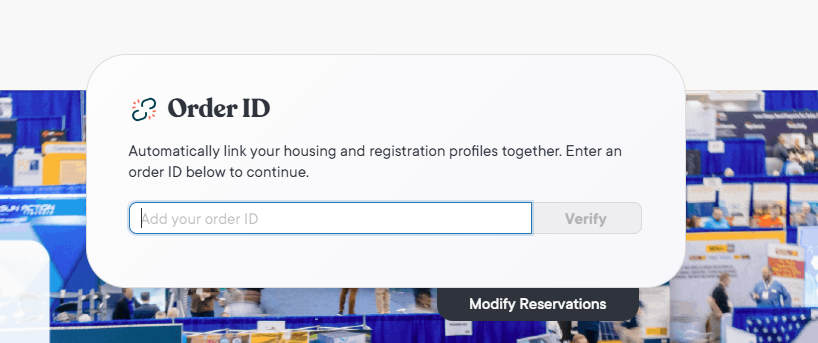
The Order ID prompt a guest sees when opening the booking link directly while Require Order ID is turned on.
If your attendees do not need to register before booking a room, you can turn this prompt off. Guests will then be able to open the booking link from anywhere and book directly into the block.
|
Before you start, have these ready
|
STEP 1: Open Integrations
From your event in Resiada, click Manage in the top navigation bar. In the menu that opens, look under the Advanced column and select Integrations.
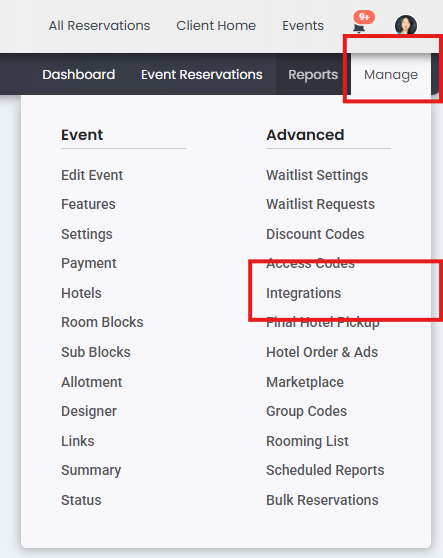
The Manage menu. Integrations is listed under the Advanced column.
STEP 2: Uncheck Require Order ID
On the Integrations page, scroll down to the Advanced Settings section near the bottom. Uncheck Require Order ID, then click Save Settings at the bottom right of the page.

Advanced Settings with Require Order ID unchecked. Click Save Settings to apply the change.
|
GOOD TO KNOW With Require Order ID turned off, reservations made through the booking link will not sync to a registration record in Streampoint. Housing and registration are tracked separately for those guests. Only turn this setting off when you do not need housing tied to registration for your event. If your registration team relies on that link, check with them first. |